One Platform.
One Team.
Your Contractor Business, Running Better.
Stop juggling disconnected software, chasing follow-ups, and managing every detail yourself. DeskBuilt brings your leads, estimates, projects, scheduling, invoices, team, and daily operations into one connected workspace. Run it with your own team—or let My Virtual Resources handle the back-office services you need.
Built for contractorsSoftware + optional U.S.-based operations teamOne connected workspace
Screens from the running product, using sample data.

One platform. A real team to run it.
My Virtual Resources provides U.S.-based lead desk, project, admin and operations support for contractors.
Meet My Virtual Resources →Managed services are optional and separately scoped.
- Built for
- Roofing
- Painting
- HVAC
- Plumbing
- Electrical
- Remodeling
- Construction
- Home Services
You didn’t start a contracting business to spend your day managing software.
One system for leads. Another for scheduling. Another for projects. Another for invoicing. Spreadsheets for payroll, hiring, commissions, and everything in between. And somehow, you’re still the person everyone comes to for answers.
- Leads sit too long without follow-up.
- Project information gets lost between departments.
- Scheduling, tasks, and customer updates require constant attention.
- Estimates and invoices need someone to follow up.
- Reporting means pulling information from multiple places.
You don’t need another app to manage. You need a better way to run the business. That’s why we built DeskBuilt.
From the first call to the final payment.
Click any stage to see the real DeskBuilt screen behind it. From the first homeowner inquiry to the final payment, your team knows what comes next.
Lead
Every inquiry lands in one pipeline, with who it is, where it came from and what happens next.
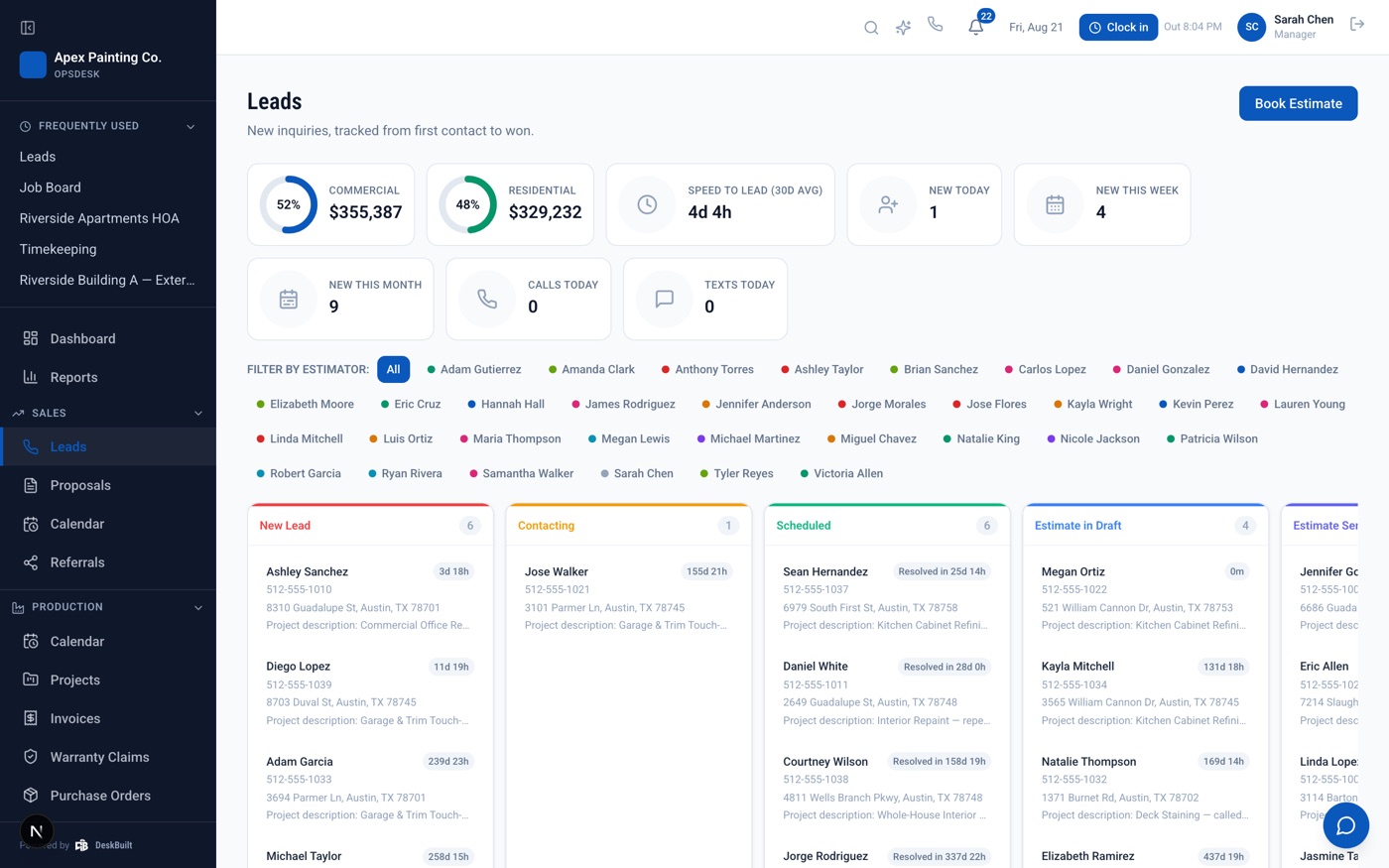
One place for the entire business behind the job.
From the first homeowner inquiry to the final payment, DeskBuilt helps bring the moving parts of your operation together so your team knows what comes next. These are real screens from the product.
Lead Management & Sales
Capture inquiries, manage your pipeline, follow up with prospects, create estimates, and move opportunities toward booked work.
- Pipeline board for every lead
- Estimates with e-signature
- Deposits collected when a client says yes
Other platforms give you software. We can give you the team to run it.
DeskBuilt was created by the team behind My Virtual Resources, drawing on more than seven years of managing day-to-day operations for contractor and home-service businesses. We understand lead follow-up, project intake, estimate scheduling, recruiting, and the small details that keep the work moving, because we do that work ourselves.
Our U.S.-based team can support the operational functions you choose, using documented workflows, team oversight, and DeskBuilt as a connected workspace. You choose what to delegate; we provide the people, processes, and oversight.
Real operators. Real follow-through.
Choose the functions you want to delegate. Keep visibility in DeskBuilt while a real team handles the approved work.
- Inbound & outbound lead desk
- After-hours call support
- Project coordination
- Admin & recruiting
Managed services are optional and separately priced and scoped. The software and the managed support are distinct offerings.
Your Client Portal with MVR.
One place to see what your MVR team is doing for you: sales results, calls and leads, messages, your calendar, tasks and your team.
Shown with a sample business and sample data.
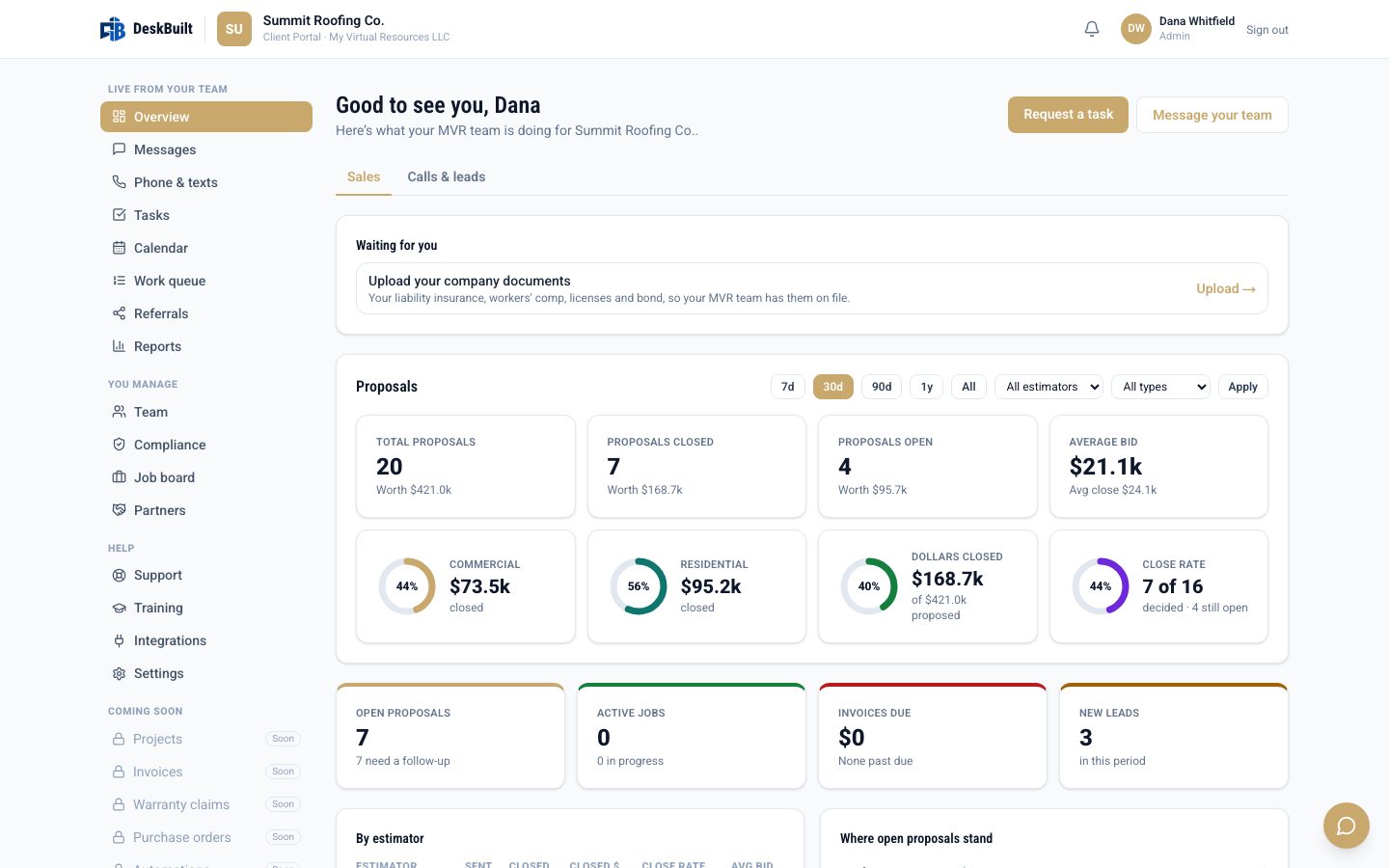
Sales
Proposals sent, closed and open, average bid, commercial vs residential, close rate, and how each estimator is doing.
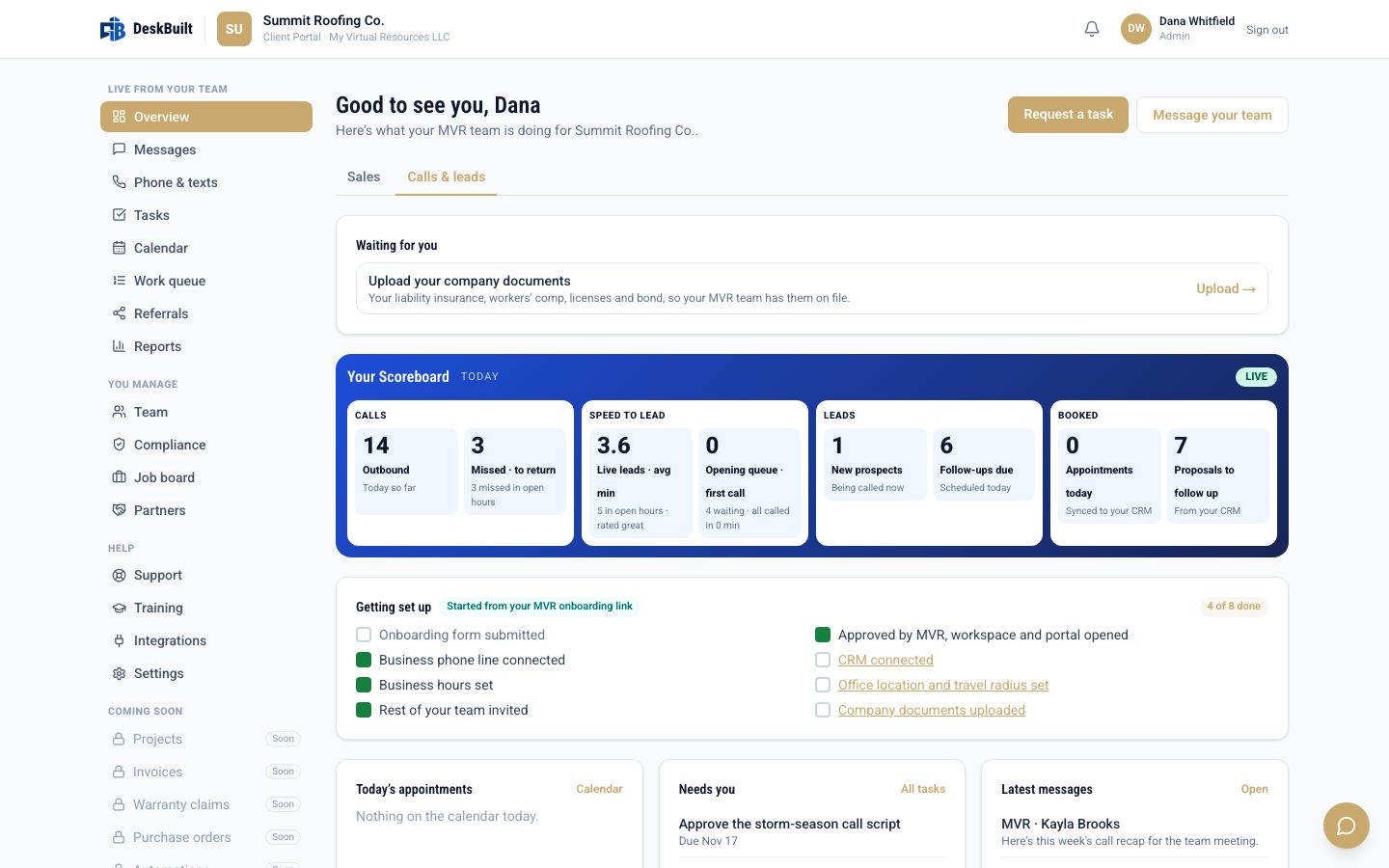
Calls & leads
A live scoreboard of calls, speed to lead and appointments booked, plus today's schedule, your tasks and what needs you.
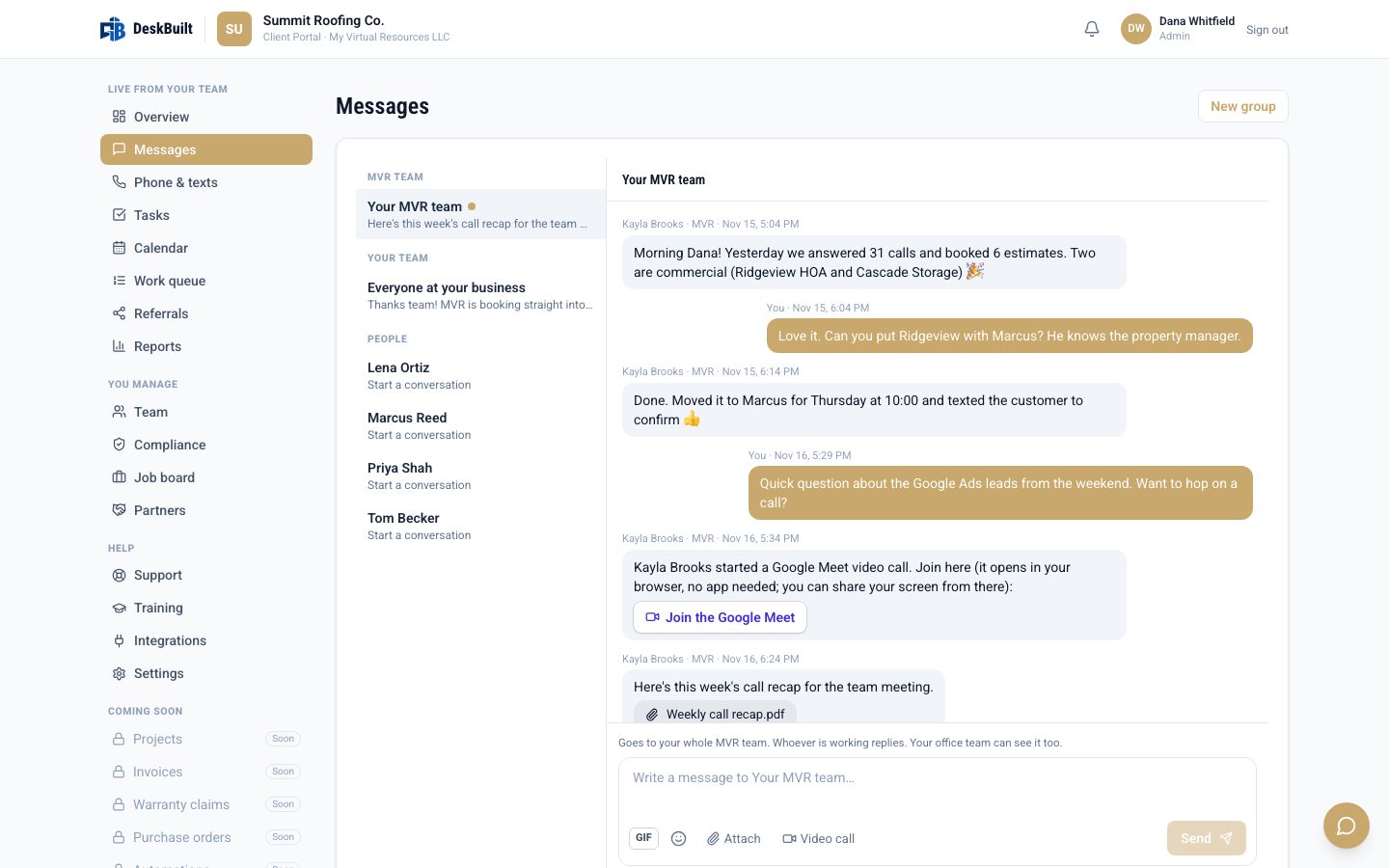
Messages
Message your MVR team or your own staff with emoji, GIFs and files, and start a Google Meet or Teams call in one click.
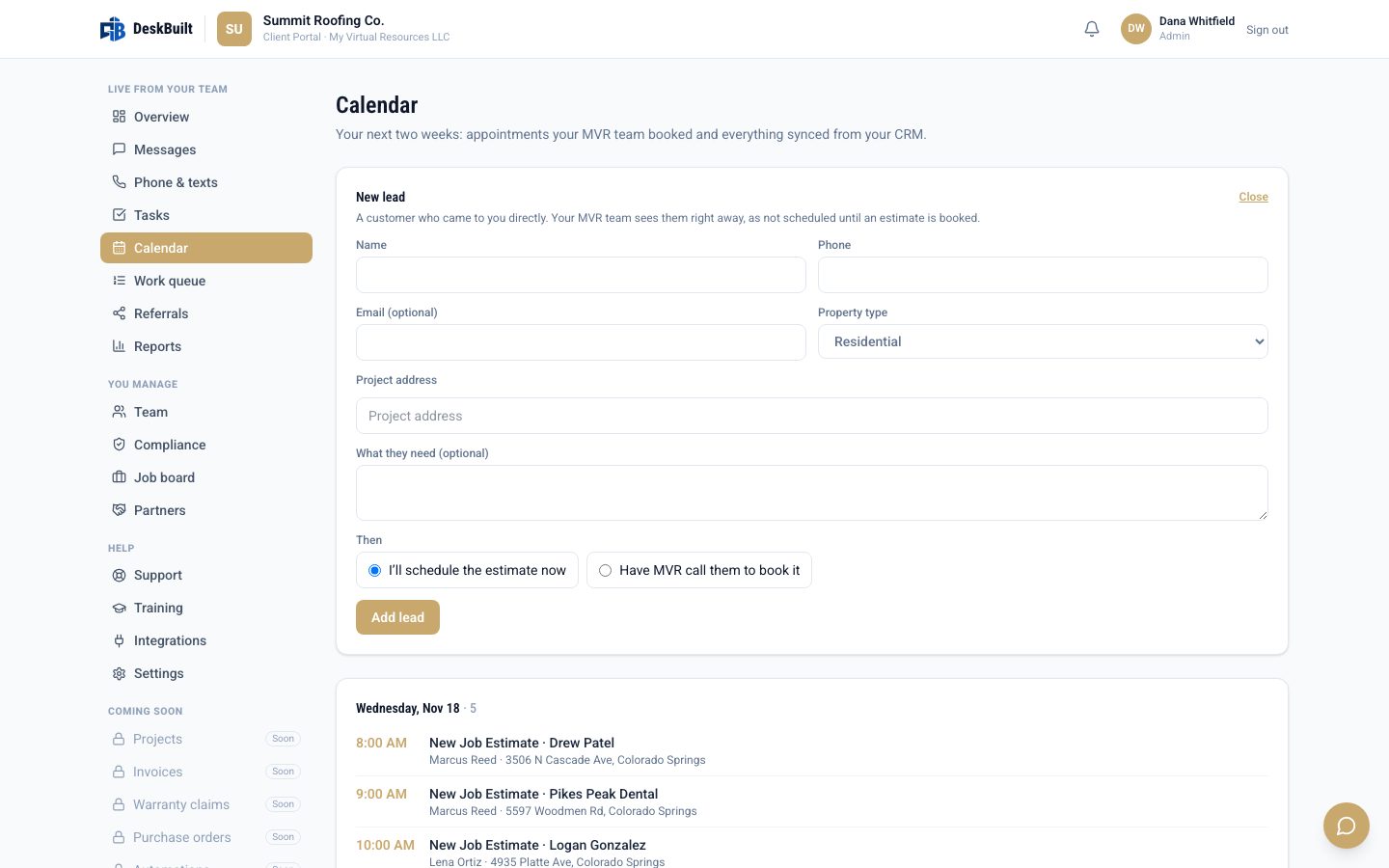
Calendar & new leads
Every booked estimate in one place. Add a customer who called you directly and book them, or have MVR call to schedule.
Your business. Your way.
Contractors can choose the platform without being required to purchase staffing.
Run DeskBuilt with your own team.
Get the software and organize your operations in one workspace, with collaboration, workflows, visibility, and reporting.
Best for contractors with an existing team.
- Organize leads, jobs, scheduling, finance and hiring
- Use your own employees and workflows
- No managed support required
The platform connects the work. The team can keep it moving.
No forced bundles. Managed staffing services are optional and separately priced and scoped; they are never included in the software price.
Choose the functions you want help with.
Pick your company stage and how you want to operate. This is a planning tool, not a quote: it doesn’t create an account or collect anything about you.
Level may be adjusted based on actual workload volume, which can outweigh revenue.
A more organized way to run your company.
- Company size
- Level 3
- Operating model
- Software + MVR
- Functions to delegate
- 2
Inbound Lead Desk · Project Coordination
Final level and pricing depend on actual workload, scope and service capacity. This is not a binding quote.
Paste your selections into the call booking notes if you’d like. Nothing is sent from this page.
We make getting organized simple.
Step 1: Show us how your business runs
Tell us your existing tools, bottlenecks, and most important workflows.
Step 2: Bring your operations together
Use DeskBuilt and its supported integrations to connect your information and processes.
Step 3: Choose who runs the work
Use your employees, My Virtual Resources, or a combination.
Step 4: Run a more organized business
Manage leads, projects, customers, team activity, and reporting with clearer handoffs.
Keep the tools you need. Bring the work together.
Already using software you like? DeskBuilt works alongside supported business tools so you can manage more of your workflows from one place and reduce duplicate entry.
- Available

QuickBooks Online
AccountingCustomers, invoices and payments from DeskBuilt to QuickBooks.
Setup: Connect your own QuickBooks Online account from Settings.
- Available

Gusto
PayrollRun payroll in your own Gusto account; DeskBuilt links straight to it.
Setup: Use your own Gusto account; open it from Time & Payroll.
- Available

Stripe
PaymentsOnline invoice payments and automatic payment reminders.
Setup: Connect your own Stripe account; deposits and final payments from your client's proposal and invoice go straight to it.
- Available

Google Calendar
CalendarAppointments and invites out to your calendar; events you add there show up in DeskBuilt, with a short delay.
Setup: Each user connects their own calendar from Settings.
- Available
Microsoft Outlook Calendar
CalendarAppointments and invites out to your calendar; events you add there show up in DeskBuilt, with a short delay.
Setup: Each user connects their own calendar from Settings.
- Available

Google Meet
Video meetingsAdd a Google Meet link to an appointment; the join link goes out with the invite and confirmation email.
Setup: Comes with a connected Google Calendar; tick “Add a video meeting” when booking.
- Available
Microsoft Teams
Video meetingsAdd a Teams link to an appointment, or start a Teams meeting right from a team chat or direct message.
Setup: Comes with a connected Outlook calendar on a work or school Microsoft 365 account.
- Available

Quo
Calls & textingSend text messages and see call and message history on the client record.
Setup: Bring your own Quo account and API key; one text provider is connected at a time.
- Available

Twilio
Calls & textingText messaging with clients, logged on their record.
Setup: Bring your own Twilio account; one text provider is connected at a time.
- Available

ServiceMinder
Lead sourcesNew leads from ServiceMinder come into DeskBuilt automatically, ready to work.
Setup: Add a ServiceMinder connector in Settings and paste your ServiceMinder API key.
- Available

Google Ads lead forms
Lead sourcesLeads from your Google Ads lead forms land in DeskBuilt the moment they're submitted.
Setup: Add a connector in Settings, then paste its private address into Google Ads.
- Available

Facebook & Instagram lead ads
Lead sourcesLeads from your Meta lead ads land in DeskBuilt the moment they're submitted.
Setup: Add a Meta connector in Settings and follow the step-by-step setup.
- Available
Web forms & other tools
Lead sourcesAny web form or service that can send a webhook can send its leads into DeskBuilt.
Setup: Add an “Any other tool” connector in Settings and point your form at its private address.
- Available
Custom API & webhooks
Custom APIConnect your own software: send in new leads, read your leads, clients, estimates, invoices and projects, and get webhooks when a lead comes in, an estimate is signed, an invoice is paid or a project is completed.
Setup: Create API keys and webhooks in Settings on plans that include API access.
Only integrations that work in DeskBuilt today are listed. Compatibility and setup requirements should be confirmed before you rely on any connection; names are the property of their owners and don’t imply endorsement.
Not every business needs the same support. Every contractor needs better systems.
Whether you’re a two-person company or managing multiple crews and departments, DeskBuilt is designed around the processes contractors use every day.
- Roofing
- Painting
- HVAC
- Plumbing
- Electrical
- Remodeling
- Construction
- Home Services
Start with the functions you need today. Expand workflows, your team, and managed services as you grow.
Managing several contractor businesses?
DeskBuilt also supports agencies that run multiple clients, with a branded portal for each one.
What does an unanswered call cost you?
Enter your own numbers to see what missed calls could be worth in a month. It’s a scenario you control, nothing more.
Formula: missed calls per week × the share of calls that would become jobs × average job value × 4.33 weeks a month. This is an illustration of your own assumptions, not a promise of recovered revenue or a prediction of results.
Built by operators. Not just software developers.
After years of helping contractors answer leads, schedule estimates, organize jobs, recruit team members, and keep daily operations moving, one thing became clear: contractors didn’t need more disconnected tools. They needed their systems and the people using them to work together. DeskBuilt grew from that practical experience.
Designed around real workflows
Sales handoffs, job-ready details, recruiting, admin tasks, and what needs to happen next.
Documented processes, clear oversight
Managed support follows documented workflows with team oversight, and you keep visibility in DeskBuilt.
Operations you can delegate
Buy the platform alone, or pair it with the particular managed functions your business needs.
Software designed around real operations. Support built around real businesses.
Simple, transparent software pricing.
DeskBuilt is in early access. Join the waitlist to try it free for 14 days with founder pricing. Prices below are for the software only; My Virtual Resources managed support is optional and separately scoped.
For your own business
For agencies managing clients
Built around how contractors actually operate.
Is DeskBuilt just another CRM?
No. Lead management is only one part of the platform. DeskBuilt also covers project workflows, scheduling, estimating, invoicing, workforce operations, hiring, and reporting.
Do I have to hire My Virtual Resources?
No. You can use DeskBuilt with your existing team. Managed support is optional and separately priced and scoped.
Can MVR handle only certain functions?
Yes. MVR's contractor staffing model is modular, allowing clients to select the services they need.
Do I have to replace all my existing software?
Not necessarily. DeskBuilt supports selected integrations, listed above. Compatibility and setup requirements should be confirmed before relying on a connection.
Is DeskBuilt built for small and established businesses?
Yes. It's intended for owner-led contractors through larger multi-team businesses.
Can I sign up today?
DeskBuilt is in early access. Join the waitlist to be among the first to try the app free for 14 days, with founder pricing at a lifetime discounted rate. You can also book a demo any time.
You handle the work you’re great at. We’ll help handle the rest.
Bring your contractor business together with DeskBuilt. Then decide how much of the day-to-day work you want to hand off to our team.
One platform. One connected operation. A better way to grow.
Want early access instead? Join the waitlist. Managed support is optional and separately priced.